
White Dot on Mobile Screen: Causes, Fixes, and Prevention Tips
-
 by
by
- in Technology


It’s annoying to see a white spot on your smartphone’s screen out of nowhere. Generally, majority of the users detect the very small bright spot when they are playing a video, game, or when they are visiting social media. Sometimes it stays small and in a different case, it gradually expands the display. There are problems with this on both Android phones and iPhones and typically these problems are not software damage, but rather hardware.
When you have a White dot on mobile screen, it’s crucial to understand the root cause in order to avoid unnecessary repairs or replacement costs. Simple troubleshooting may resolve the problem or severe problems may call for replacement of the display.
What Is a White Dot on Mobile Screen?
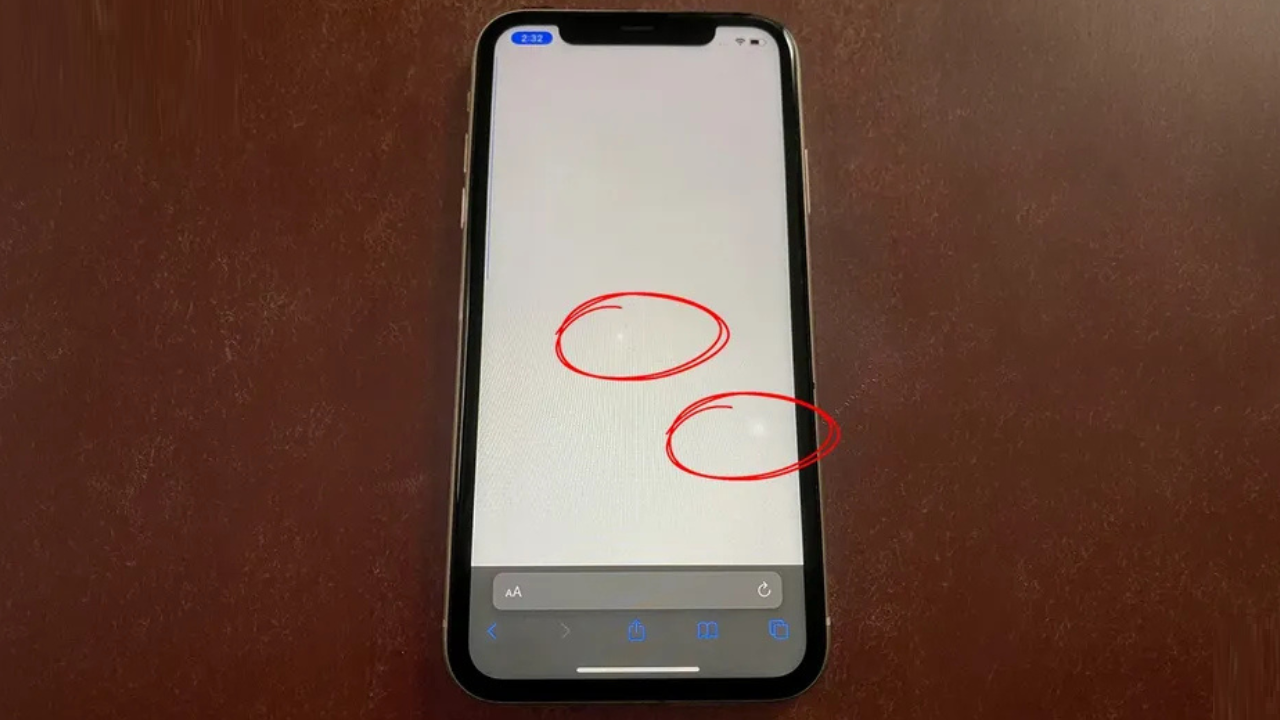
A white dot on a mobile phone display is typically a bright spot that doesn’t fade away when the phone is displaying other content. It could be a small glowing dot, a bright white spot, or a bright spot under the screen.
This problem typically occurs on LCDs, but it could also occur on OLED panels. White spots are not the same as dead pixels, as described by some users. Typically, dead pixels are black and stuck pixels are white or colored.
The white spot is more likely to be seen if the screen’s brightness is raised or a dark background is employed.
Common Causes of White Dot on Mobile Screen
Pressure Damage
Mobile displays are frequently subject to pressure damage, it is one of the leading causes of white spots. It is not recommended to place the phone in a tight pocket, on it or to apply excessive pressure, as this may damage the inside display layers. After the LCD layers are damaged, they will leave behind visible white spots.
Stuck or Damaged Pixels
A stuck pixel is a pixel that remains on and emits a white light all the time. This is normally displayed as a small glowing spot on the screen. Stuck pixels will appear as a small dot (or two) unlike large white patches.
Backlight Leakage Problems
LCD displays utilize backlight to illuminate the display. When the inner layers become loose or get damaged, the back-light may leak unevenly, leading to glowing areas of white. This is typically seen at the borders or middle of the screen.
Moisture or Water Damage
Even a tiniest bit of water or moisture present in the phone will have an impact on the display panel. White patches, flickering screens, or touch problems can all result from water damage. This issue is likely to occur more often on phones that are exposed to rain, humidity and accidental spills.
Swollen Battery
When the battery is swollen, it may push against display from within the phone. This is caused by internal pressure and can occasionally lead to bright white spots on the screen. The battery should be inspected if it enlarges as it grows or the back panel begins to bulge.
Poor Screen Replacement
But bad display replacements can also lead to white spot issues. Sometimes, pressure points under the screen are created as a result of improper installation, loose screws or cheap display panels.
How to Fix White Dot on Mobile Screen
Restart the Device
Try to reboot your phone once before assuming that it suffered serious damage. Sometimes the behaviour of the screen is affected by temporary software glitches.
Remove the Phone Case
An extremely tight cell case can apply stress to the edge of the display. If the case is removed for a few days, it will be clear if the problem is due to pressure from the outside.
Test the Screen
Open an image that is solid black or solid white in full screen. This will help to determine if it is a stuck pixel, pressure mark or back light leak problem.
Try Pixel Fixer Tools
Pixel-fixing apps or flashing color tools can help to bring a stuck pixel back to life if the problem is due to a stuck pixel. However, these tools typically will not function for physical equipment issues.
See a Professional Technician
However, when the white spot grows, or is always visible, it is usually best to visit the professional for a repair. Technicians will be able to check the display and battery status to determine what is causing the issue.
How to Know if the Problem Is Hardware Related
A simple way is to take a screen shot. Use your phone to take a screenshot and then view it on another device. If the white spot isn’t showing in the shot, the problem is probably with its display hardware.
The other indicator of hardware damage is the white patch even after turning the phone on or resetting software settings.
Tips to Prevent White Spots on Mobile Screen
- Don’t store the phone in a tight fitting pair of jeans or packed bag.
- Apply a good protective case to the appliance.
- Do not put the phone in water or moisture.
- Avoid applying excess pressure when removing dust from the screen
- Don’t overheat while in use or while charging (when gaming)
- Replace screen with original parts.
When it comes time to display in the future, taking care of it can greatly minimize the risk of screen damage.
Final Word
A white dot on mobile screen can be a minor problem and if neglected, become more significant damage to the screen later. This is often due to pressure damage, stuck pixels, backlight leakage, moisture, and battery swelling. The white spots can sometimes be repaired using software, but if they are severe, a repair or display replacement will be necessary. It is important to identify the problem as early as possible to avoid further damage and repair expenses.
FAQs
1.Why is there a white dot on the mobile screen?
The most common causes of white dots are pressure damage, stuck pixels, backlight leakage or battery swelling within the phone.
2.Is there a solution to a white spot on phone screen?
Yes, stuck pixels can be repaired with a pixel repair tool, but if the screen is damaged, it may need repair or replacement.
3.Is there a danger in a white dot on cell display screen?
It can be serious if it’s caused by the battery being swollen or if the display is damaged within the battery. Leaving it may cause it to get worse.
4.Are there any white spots on screens due to water damage?
Absolutely, moisture within the displays can cause trouble, white patches, flickering and touch issues.
5.If I have the white dot problem, should I get a new display?
Once white spots have spread and touch is not functioning or if it becomes permanent, it is likely best to replace the display.
Read more: The Best PDF Highlighter Apps for Android in 2023

No comment